Add the Breadcrumb Dev Account to an Autodesk Construction Cloud Project
After creating the Breadcrumb Custom Integration in Autodesk Construction Cloud (ACC), the Breadcrumb Dev system account is automatically created at the account level. To enable Breadcrumb to sync project data, add this account to the ACC project you want to connect.
Overview
When the custom integration is created:
-
A new Account Level Member called Breadcrumb Dev is automatically added.
-
This is a Self-Service Account, meaning no Breadcrumb employees have access to your Autodesk account.
-
The account is used only for secure system-to-system integration.
The Breadcrumb Dev user will automatically have Account Administrator access.
However, for Breadcrumb to sync project data, the user must also be added at the Project Level.
Step-By-Step
Step 1 — Confirm the Breadcrumb Dev Account Exists
-
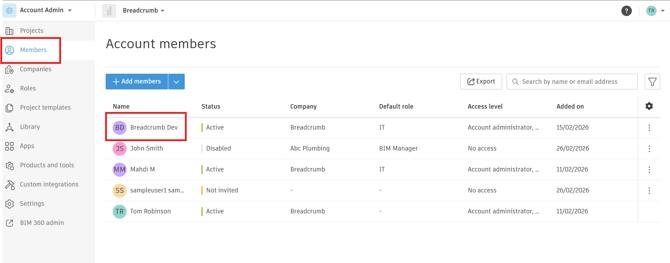
In Autodesk Construction Cloud, go to Account Admin.
-
Select Members.
-
Locate the user Breadcrumb Dev in the member list.
This confirms the integration account was successfully created.
(Example shown below)
Step 2 — Open the Project Admin Settings
-
Navigate to the project you want to integrate with Breadcrumb.
-
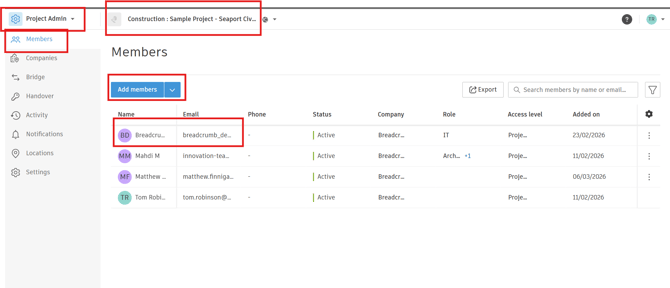
Open Project Admin.
-
Select Members.
(Example shown below)
Step 3 — Add the Breadcrumb Dev User to the Project
-
Click Add members.
-
Search for Breadcrumb Dev.
-
Select the user and add them to the project.
When added, the user will automatically be assigned:
-
Access Level: Project Administrator
Step 4 — Assign Required Product Access
After adding the user:
-
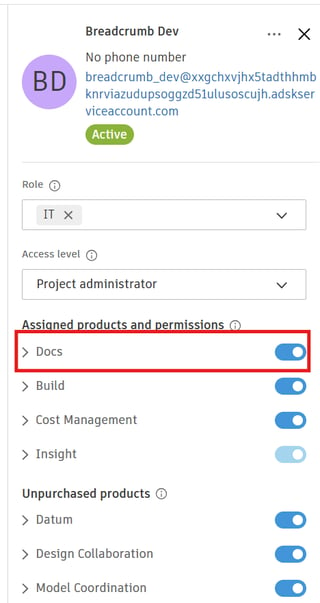
Open the Breadcrumb Dev member settings.
-
Ensure Build is enabled.
-
Apply a role if required by your company permissions.
4. Click Save.
Step 5 — Integration Activation
Once the Breadcrumb Dev user has been added to the project:
✅ Breadcrumb will automatically begin syncing this Autodesk project.
✅ The integration is now active for that project.
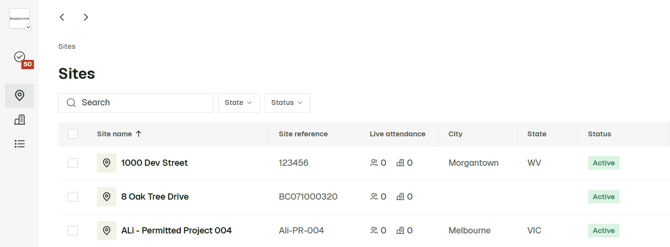
The Project Name, Number and Address will sync to Breadcrumb and to create the site in Breadcrumb