
Instead of adding the Breadcrumb Dev user to each project manually, you can configure a Project Template in Autodesk Construction Cloud. Any new project created from this template will already include the Breadcrumb Dev user and the required permissions, so it will sync with Breadcrumb automatically.
Prerequisites
Before starting, ensure the following requirements are met:
-
The Breadcrumb Custom Integration has already been created at the account level, and the Breadcrumb Dev user exists.
-
You have Hub Admin / Account Administrator access in Autodesk Construction Cloud.
Step-By-Step
Step 1 — Create a Role for IT or Dev
-
Go to Hub Admin.
-
Create a role for the Breadcrumb Dev user, or use an existing one, for example IT or Dev Role.
-
Give this role Project Administrator access to Build.
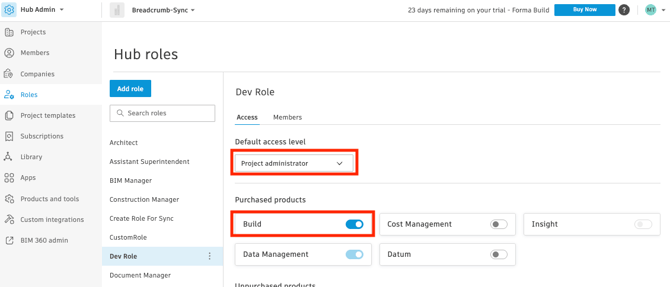
This role is what gives the Breadcrumb Dev user the access it needs inside each new project.
Step 2 — Create the Project Template
Create a new Project Template that all future projects will be based on OR use an existing Project Template
Step 3 — Add Breadcrumb Dev to the Template
-
Open Project Admin for the template.
-
Under Project Setup, click Project Members.
-
Click Add members and add the Breadcrumb Dev user with:
-
Access Level: Project Administrator
-
Product: Build
-
Role: the role you created in Step 1 (e.g. IT or Dev Role)
The role must have Project Administrator access to Build, or the project will not sync with Breadcrumb.
Step 4 — Configure Daily Report Form Permissions in Build
-
Go to the Build tools.
-
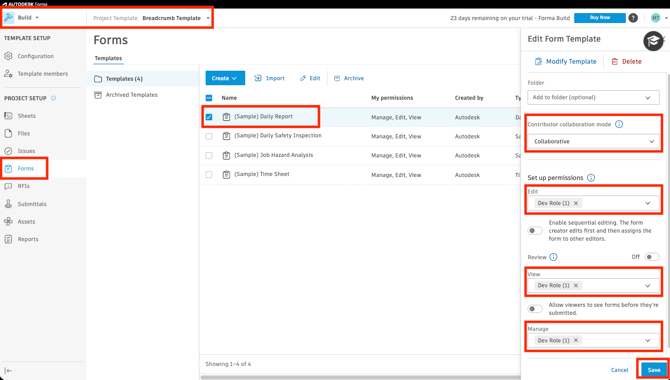
Open Forms within Build.
-
Click (Sample) Daily Report, or your chosen Daily Report template.
-
Add the IT / Dev Role (or the default role you chose) to the Edit, View and Manage dropdowns.
-
Click Save.
Result
✅ Any new project created from this template will automatically include the Breadcrumb Dev user with the correct permissions.
✅ Those projects will sync with Breadcrumb automatically, with no manual setup required per project.